Docker
It’s possible for Docker containers to retrieve credentials from aws-vault running on the host.
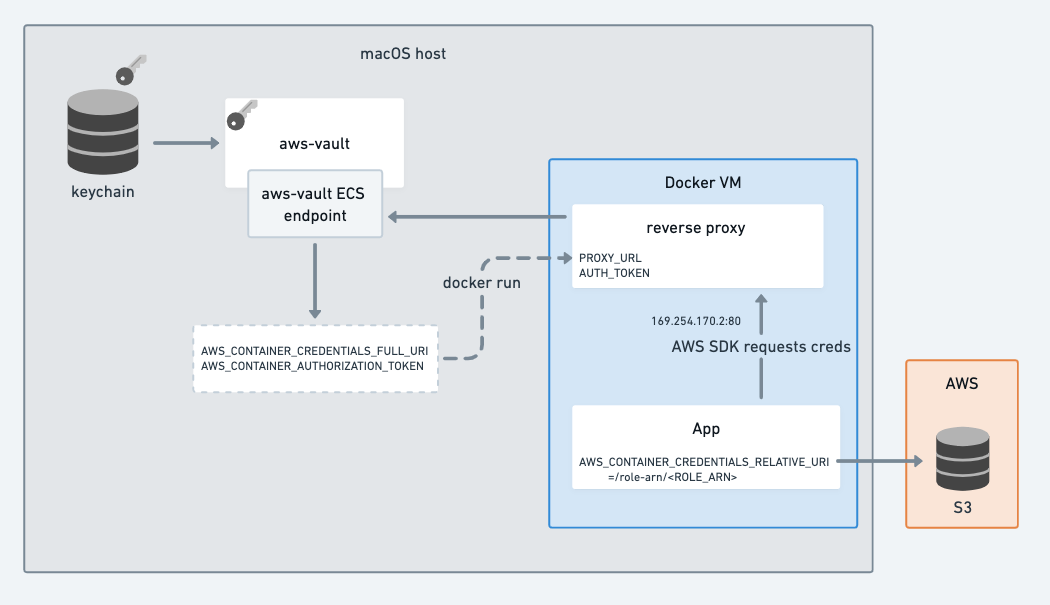
The ECS server responds to requests on /role-arn/YOUR_ROLE_ARN with the role credentials, making it usable with the
AWS_CONTAINER_CREDENTIALS_FULL_URI or AWS_CONTAINER_CREDENTIALS_RELATIVE_URI environment
variables. These environment variables are used by the AWS SDKs as part of the
default credential provider chain.
In particular, this is designed to allow aws-vault to run on your local host while docker images access role credentials
dynamically. This is achieved via a reverse-proxy container (started with aws-vault exec --ecs-server --lazy PROFILE -- docker-compose up ...) using the default ECS IP address 169.254.170.2. Docker containers no longer need AWS keys at
all - instead they can specify the role they want to assume with AWS_CONTAINER_CREDENTIALS_RELATIVE_URI.
This use-case is similar to the goal of amazon-ecs-local-container-endpoints, however the difference here is that the long-lived AWS credentials are getting sourced from your keychain via aws-vault.
To test it out:
Add a base role to your
~/.aws/config(replacing with valid values)[profile base-role] source_profile=myprofile role_arn=arn:aws:iam::222222222222:role/aws-vault-test mfa_serial=arn:aws:iam::222222222222:mfa/<your.aws.username>Start a reverse proxy:
cd contrib/_aws-vault-proxy
aws-vault --debug exec --server --lazy base-role -- docker compose up --build aws-vault-proxy
In a new terminal, assume a new role
$ export AWS_CONTAINER_CREDENTIALS_RELATIVE_URI=/role-arn/arn:aws:iam::222222222222:role/another-role-that-can-be-assumed-by-base-role
$ docker-compose run testapp
testapp $ aws sts get-caller-identity